
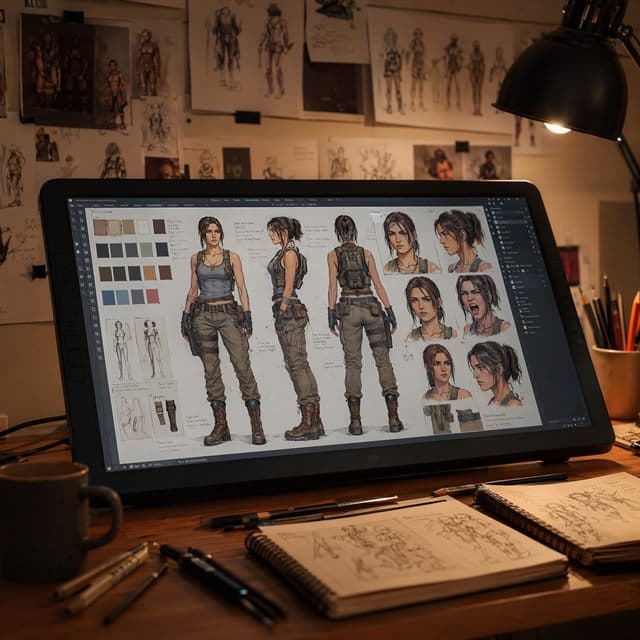
A strong AI character does not start with a dramatic scene. It starts with a reference sheet. If you skip that step, every later prompt asks the model to invent missing details: the back of the jacket, the side profile, the boots, the expression range, and the color palette.
This guide shows how to write a reference sheet prompt that gives your character a stable source of truth before you generate comics, storyboards, game concepts, or video frames.
Start With Identity, Not Action
Most prompt failures happen because creators mix identity and scene direction too early. A prompt like "a cyberpunk girl running through rain" may look exciting, but it does not define the character clearly enough for reuse.
Begin with protected traits:
- Face shape and age range
- Hair length, color, and texture
- Body proportions and silhouette
- Main outfit pieces
- Signature colors or accessories
The goal is not a beautiful poster. The goal is a reusable actor. Once that actor is stable, the scenes can become more ambitious.
Use a Structured Reference Sheet Prompt
A reliable prompt should request multiple views in one production asset:
- Front view
- Side view
- Back view
- Close-up portrait
- Neutral expression and two emotion variants
- Color swatches and outfit notes
For example: "Create a clean character reference sheet for a young explorer with short black hair, amber jacket, compact backpack, fingerless gloves, and round goggles. Show front, side, back, close-up face, happy expression, serious expression, and color palette. Keep the same face and outfit in every view."
Add Negative Notes
Reference prompts should also say what must not change. Add notes such as "do not change hairstyle," "do not add new armor," "keep the jacket amber," or "keep the same face proportions." These constraints reduce drift when you later generate action poses.
In Consistent Character AI, this is easier because the character profile becomes the memory. You do not have to rewrite the entire sheet every time.
Turn the Sheet Into a Workflow
After generating the sheet, choose one approved version and save it. Then use it as the anchor for scene prompts, comic panels, storyboard frames, and video keyframes. If one angle looks wrong, fix the sheet before moving into production.
A good character sheet saves time because it makes every later generation less random. Generate a reference sheet before you build the scene, and your character will have a much better chance of staying recognizable.